
A satellite dish, a laptop and a monitor together draw roughly 100W to 200W, so a 1,000Wh station runs a session of about six hours and a 2,000Wh station runs a workday and a half. Add 400W of solar and the setup can run indefinitely in good weather. Here is how to work out your own budget.
Build the power budget
Check each device's label or your account page. These ranges are typical, and your devices may differ:
- A standard Starlink dish with router: roughly 50 to 100W. The Mini draws roughly 20 to 40W and can run from a 12V or USB-C power source.
- Laptop: 45 to 65W while charging, 20 to 30W at rest.
- External monitor: 20 to 40W.
- Phone and small devices: 10 to 20W.
A full setup of dish, laptop and monitor averages around 150W. Over an 8 hour day that is 1,200Wh.
How many hours each size gives you
Use 85 percent of the rated capacity. At a 150W load, a 1,024Wh station runs about 5.8 hours, a 2,048Wh station about 11.6 hours and a 3,072Wh station about 17 hours. A smaller setup with a Starlink Mini, laptop and no monitor, around 70W, stretches the same stations to about 12, 25 and 37 hours.
Station options
The Anker SOLIX C1000 Gen 2 has ten ports and 2,000W of output, which is plenty for a desk. It accepts up to 600W of solar to keep up through the day.

Anker SOLIX C1000 Gen 2 Portable Power Station
A 1,024Wh solar generator with a water-resistant cover, built to move from room to room.
Product information
Product Review Score
4.72 out of 5 stars
(150)Product links
For a quiet desk, the DJI Power 1000 V2 lists a noise level as low as 26dB and a UPS switchover of about 10ms, so a power cut does not drop your video call.
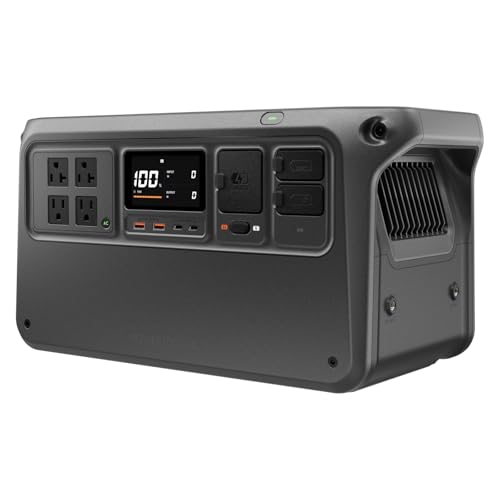
DJI Power 1000 V2 Portable Power Station 1024Wh
A 1024Wh LFP power station that charges to 80 percent in about 37 minutes and runs quietly.
Product information
Product Review Score
4.98 out of 5 stars
(27)Product links
For a day and a half of work without solar, the EcoFlow DELTA 2 Max stores 2,048Wh and expands to 6kWh with extra batteries.

EcoFlow DELTA 2 Max 2048Wh Portable Power Station
A 2048Wh LiFePO4 power station with 2400W output that charges from solar, wall outlets or your car.
Product information
Product Review Score
4.36 out of 5 stars
(203)Product links
Add solar for a workday that never ends
At 5 sun hours, a 400W panel yields about 1,500Wh a day, which more than covers a 150W workload over 8 hours. Park the panels in the sun and the desk in the shade. The EcoFlow 45W panel is light, at 3.1 pounds, though it only trickles a small charge. Plan on 200W or more for real work, such as the Anker SOLIX PS200.
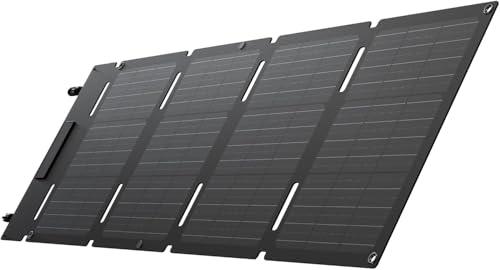
EF ECOFLOW 45W Portable Solar Panel with N-Type Cells
A foldable 45W panel with N-type cells that packs down small enough for a backpack or car.
Product information
Product Review Score
4.64 out of 5 stars
(135)Product links

Anker SOLIX PS200 Bifacial Portable Solar Panel, 200W, for Camping, RVs
A foldable 200W solar panel that catches sunlight from both sides and carries light enough for one person.
Product information
Product Review Score
4.26 out of 5 stars
(43)Product links
Practical tips
- Run the dish and laptop directly from DC or USB-C ports where you can, because it skips inverter losses.
- Turn off AC outputs you are not using. A running inverter idles at several watts.
- Set the dish where it has a clear view of the sky, and keep the station out of direct sun.
- Keep a spare cable. A wrong or damaged power cable ends a work day faster than a flat battery.
- Test the whole setup at home for a full day before the trip.
Weather and heat
A station working hard in the sun runs its fan more and may limit output. Shade the station, not just the dish. In cold weather, battery capacity drops, so plan on a smaller usable figure. Keep spare capacity on days when the weather is extreme and the connection matters most.
Backup for the backup
If a missed call would cost you money, add a phone hotspot and a small power bank to the kit. They draw very little and can keep you connected for a few hours if the dish or station fails. Charge them on the quarterly routine in the storing guide.
Pick the power source before the dish
Satellite internet makers sell dishes in several forms, and each wants a particular supply. Some use AC through a power brick, others accept 12V DC or USB-C power delivery. The best station depends on that choice. If the dish can run from USB-C at 100W or from a 12V socket, you can run the whole kit without turning on the AC inverter, which saves energy and lowers fan noise. Read the dish's power section before choosing a station.
A sample day
Suppose you work from 8 in the morning to 4 in the afternoon. The dish and router draw 75W, the laptop 45W and the monitor 25W, for about 145W. Over eight hours that is 1,160Wh. A 2,048Wh station starts the day full, finishes at roughly 33 percent after losses, and refills from 400W of panels before the next morning if the afternoon sun cooperates. That is the pattern many remote workers settle into.


